Validation
LLMServingSim is validated end-to-end against real vLLM on the
bundled (hardware, model) combos. The numbers below come from
running a 300-request ShareGPT replay through both vLLM v0.19.0 and
the simulator on RTXPRO6000, then comparing the per-request and
per-tick metrics with python -m bench validate.
Want to validate your own change? See For Contributors → Validating your changes for the regression workflow.
Setup
| Knob | Value |
|---|---|
| Workload | 300 ShareGPT-derived requests, ~10 sps Poisson arrivals |
| Hardware | RTXPRO6000 and RTX 4090, single node (profile bundles in profiler/perf/<hardware>/) |
| vLLM version | v0.19.0 (the pin used by the bench container) |
| Block size | 16 |
| Engine flags | Defaults except where the cluster config dictates otherwise |
| Cluster configs | bench/examples/<hardware>/<model>/config.json |
| KV capacity | mem_util 0.9, except the RTX 4090 example which is calibrated to the measured block count (see below) |
Inputs and outputs (vLLM token IDs, sampling params, per-request
timings) are pinned via bench's strict-replay path so both runs
process exactly the same prompts in the same order.
mem_util to the real run whenever the KV cache saturatesnpu_mem.mem_util sizes the KV cache, and KV cache size only shows up in the
results once a run actually fills it — below that nothing is preempted and
the capacity is invisible. Of the four configurations here, only the RTX 4090
one is in that regime: 24 GB, pinned at its ceiling for most of the run. It
therefore sets mem_util so the simulator's block count equals the one vLLM
resolved, read out of that run's own meta.json:
"kv_cache": { "num_gpu_blocks": 2588, "block_size": 16, "num_kv_tokens": 41408 }
That matters because the simulator does not model vLLM's activation peak or
CUDA context, so the default mem_util: 0.9 yields more KV cache than vLLM
gets at the same fraction — less preemption, an early finish, and every
latency metric moving with it:
| KV tokens | blocks | TTFT mean | TPOT mean | Latency mean | |
|---|---|---|---|---|---|
mem_util: 0.9 (default) | 54,400 | 3,400 | -20.7% | +12.9% | -12.5% |
mem_util: 0.833919 (matched) | 41,408 | 2,588 | +0.6% | +0.2% | +0.5% |
The three RTXPRO6000 configurations peak at 58-97% of their budget on a 96 GB
card, so they stay at 0.9 — calibrating them would change nothing. If you
validate against your own vLLM run, check the peak Each NPU Memory Usage in
the heartbeat first: if it approaches mem_util * 100, read num_gpu_blocks
from meta.json and match it before comparing latency at all.
Headline numbers
Mean error vs. real vLLM, per metric, on the four currently bundled configurations:
| Hardware | Model | Parallelism | TTFT mean | TPOT mean | Latency mean |
|---|---|---|---|---|---|
| RTX 4090 | Llama-3.1-8B | TP=1 dense | +0.6% | +0.2% | +0.5% |
| RTXPRO6000 | Llama-3.1-8B | TP=1 dense | -4.0% | -1.0% | -1.8% |
| RTXPRO6000 | Qwen3-32B | TP=2 dense | +1.3% | +0.8% | +1.0% |
| RTXPRO6000 | Qwen3-30B-A3B-Instruct-2507 | DP=2 x EP=2 MoE | -13.6% | -1.7% | -2.2% |
Every number on this page is read out of the committed
bench/examples/<hardware>/<model>/validation/summary.txt files, so it is
reproducible rather than quoted.
TPOT means land within 1.7% and end-to-end latency means within 2.2% on all four configurations, and the DP+EP MoE path tracks vLLM as tightly as the dense TP path on both. TTFT means are looser: -4.0% on the RTXPRO6000 Llama run and -13.6% on the MoE run.
The RTX 4090 row is the tightest of the four, inside 1% on every metric
including all percentiles. It is also the only run whose mem_util is
calibrated against the measured KV block count — see the caution above —
and the only one whose card saturates, so it is the cleanest available
apples-to-apples comparison.
That TTFT spread is expected rather than alarming, and it is worth knowing why before reading the tables. The two sides do not define the measurement identically — the simulator stops the clock when the first token's computation finishes, vLLM when the client receives it — and TTFT is dominated by queueing, so a small scheduling difference early in the run moves the mean a lot. On the MoE run the median TTFT is 138.8 ms against 108.6 ms, so a 30 ms absolute difference reads as -21.8%. Judge TTFT by its absolute error and its tail, not by percentage of a very small number: TTFT P90 through P99 land within 10.9% on every configuration, and within 1.0% on the RTX 4090 run.
Per-percentile numbers (median / P90 / P95 / P99) are in the same
summary.txt files under
bench/examples/.
Per-configuration results
RTX 4090 — Llama-3.1-8B (TP=1 dense)
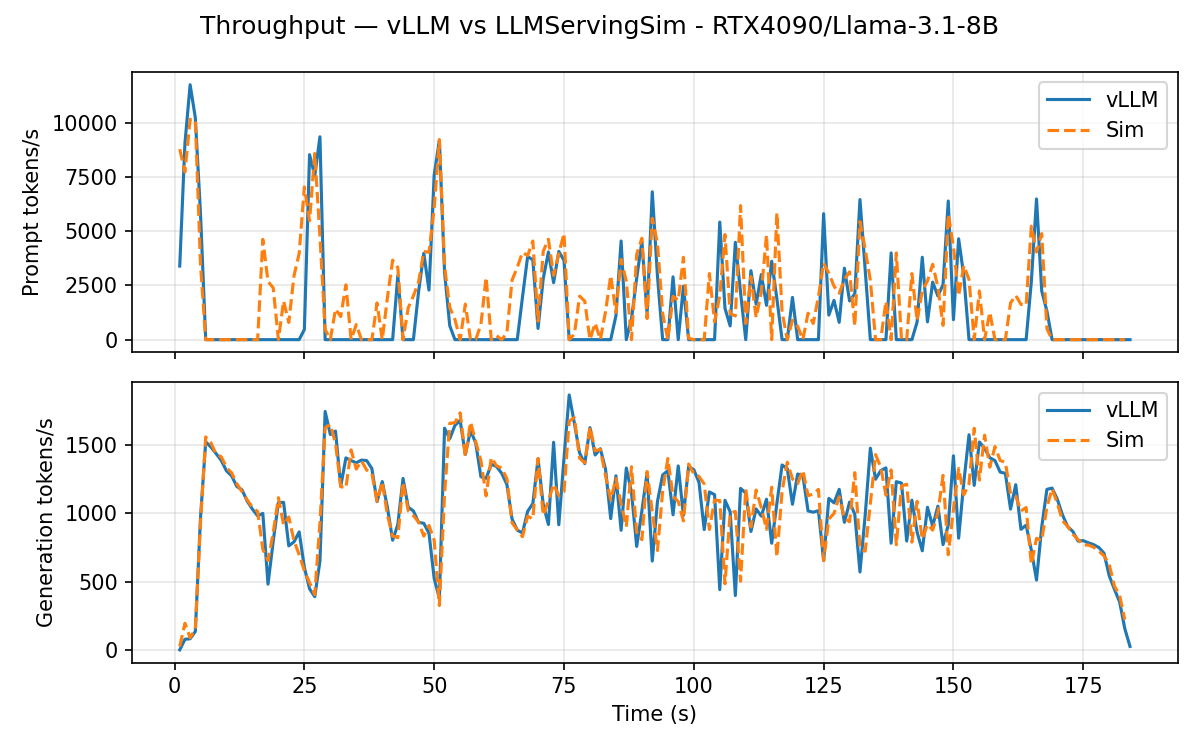
Throughput timeline, vLLM (orange) vs. simulator (blue):
| Metric | vLLM | Sim | Diff |
|---|---|---|---|
| TTFT mean | 65.46 s | 65.82 s | +0.6% |
| TTFT P99 | 137.36 s | 137.70 s | +0.3% |
| TPOT mean | 32.4 ms | 32.5 ms | +0.2% |
| TPOT P99 | 56.0 ms | 56.5 ms | +0.9% |
| Latency mean | 86.58 s | 86.98 s | +0.5% |
| Latency P99 | 153.63 s | 154.22 s | +0.4% |
The tightest configuration in the set: every metric at every percentile
lands between +0.2% and +0.9%. Two things make it the cleanest
comparison available. The 24 GB card genuinely saturates its KV cache,
so the scheduler is under real memory pressure on both sides rather than
running with slack; and its mem_util is calibrated to the block count
vLLM actually resolved, so the two are working from the same capacity.
The latency model itself is untouched — profiled latencies go in as
measured — so TPOT at +0.2% is a free prediction rather than a fit.
RTXPRO6000 — Llama-3.1-8B (TP=1 dense)
| Metric | vLLM | Sim | Diff |
|---|---|---|---|
| TTFT mean | 7.10 s | 6.82 s | -4.0% |
| TTFT P99 | 19.76 s | 19.36 s | -2.0% |
| TPOT mean | 32.5 ms | 32.1 ms | -1.0% |
| TPOT P99 | 37.3 ms | 37.6 ms | +0.6% |
| Latency mean | 28.20 s | 27.69 s | -1.8% |
| Latency P99 | 37.64 s | 37.03 s | -1.6% |
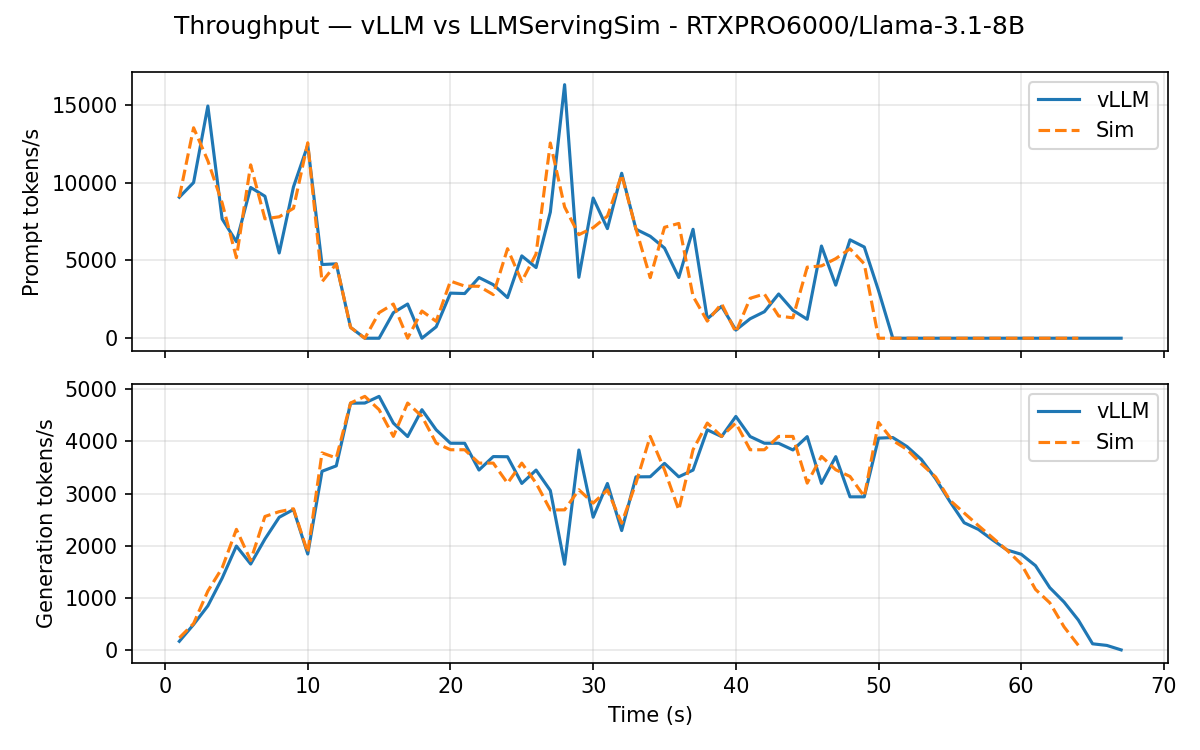
The same model and parallelism on a 96 GB card, which never fills its KV cache (it peaks at 78% of its budget). TPOT stays within 1.0% and latency within 1.8%; TTFT is -4.0% on the mean and -8.6% on the median, the simulator getting first tokens out slightly early.
RTXPRO6000 — Qwen3-32B (TP=2 dense)
| Metric | vLLM | Sim | Diff |
|---|---|---|---|
| TTFT mean | 36.91 s | 37.37 s | +1.3% |
| TTFT P99 | 93.35 s | 94.21 s | +0.9% |
| TPOT mean | 80.3 ms | 81.0 ms | +0.8% |
| TPOT P99 | 97.1 ms | 98.4 ms | +1.3% |
| Latency mean | 90.41 s | 91.33 s | +1.0% |
| Latency P99 | 126.34 s | 127.93 s | +1.3% |
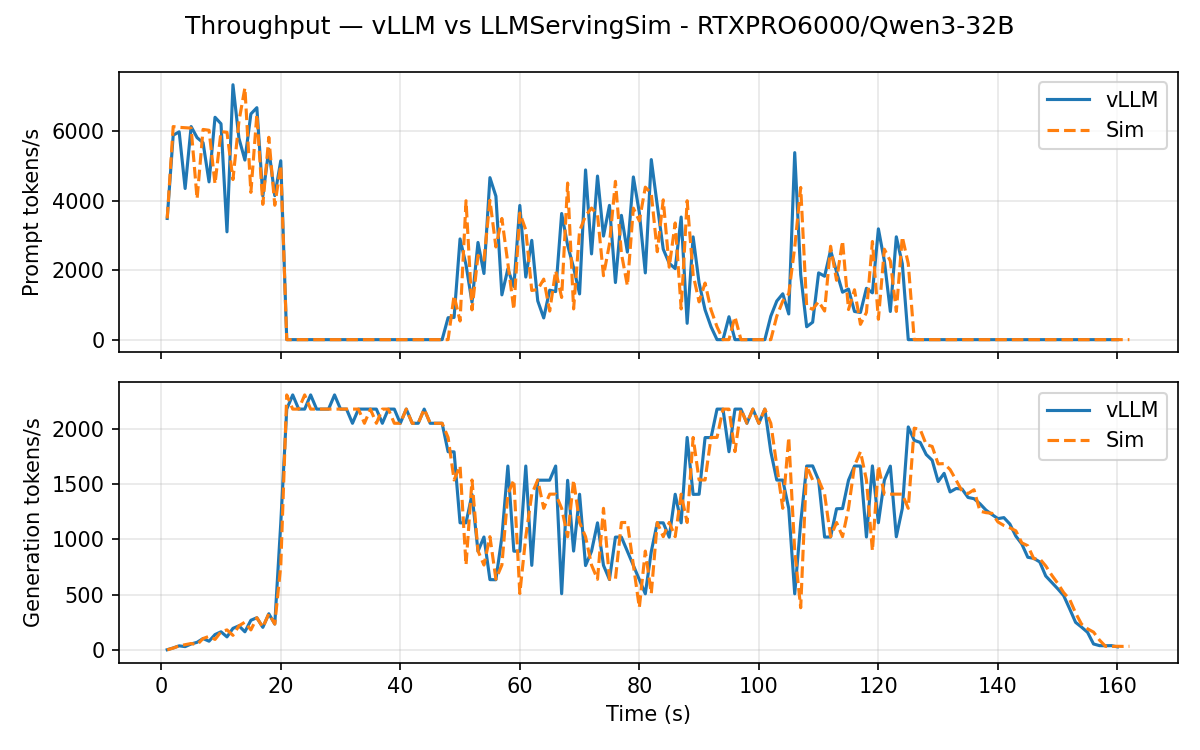
TP=2 exercises the dense ALLREDUCE collective on o_proj /
down_proj. The most uniformly accurate of the RTXPRO6000 runs: every
metric at every percentile lands between +0.8% and +1.7%, and all of
them are positive — the simulator over-predicts by a small, consistent
margin rather than drifting.
RTXPRO6000 — Qwen3-30B-A3B-Instruct-2507 (DP=2 × EP=2 MoE)
| Metric | vLLM | Sim | Diff |
|---|---|---|---|
| TTFT mean | 1.09 s | 0.94 s | -13.6% |
| TTFT P99 | 9.59 s | 9.49 s | -1.0% |
| TPOT mean | 47.3 ms | 46.5 ms | -1.7% |
| TPOT P99 | 53.3 ms | 53.0 ms | -0.5% |
| Latency mean | 32.34 s | 31.65 s | -2.2% |
| Latency P99 | 43.90 s | 43.09 s | -1.8% |
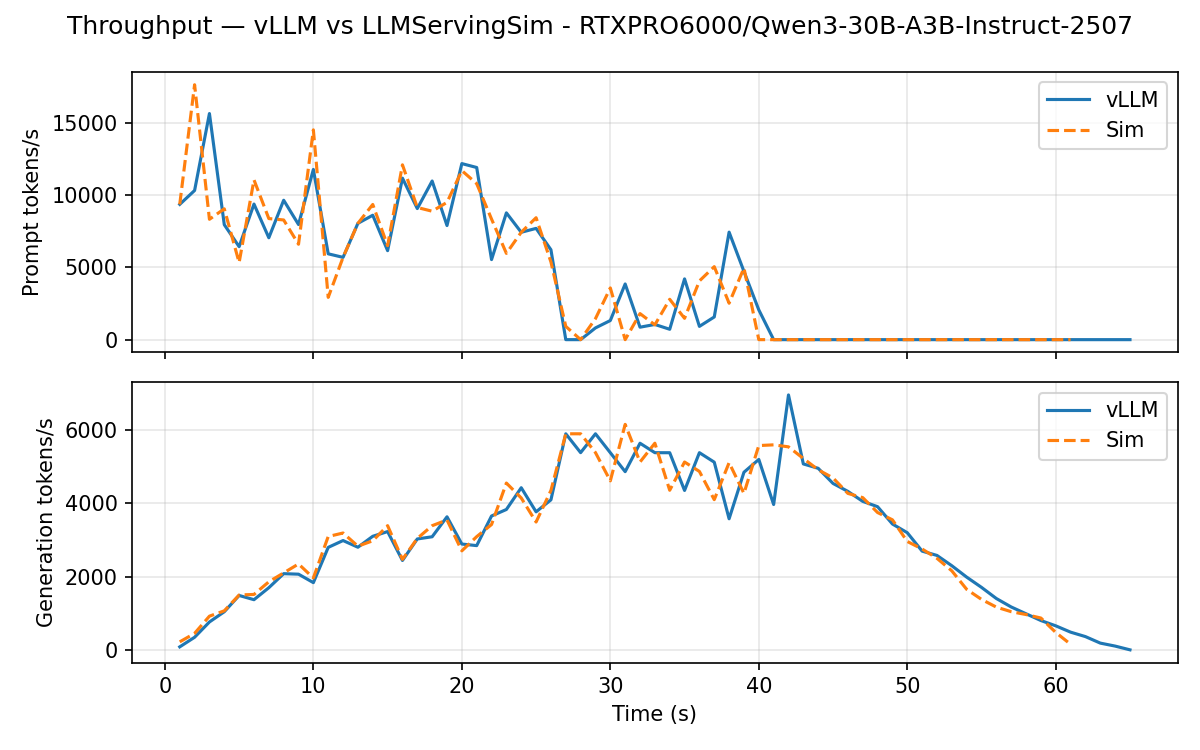
The disaggregated path: data-parallel across two instances, expert-parallel within each, with wave-synchronized collectives. TPOT and latency hold to -1.7% and -2.2%, but TTFT reads -13.6% on the mean and -21.8% on the median. The absolute numbers explain most of that: the median is 138.8 ms against 108.6 ms, a 30 ms difference on the smallest values in the whole set. The tail, where absolute queueing dominates, comes back to -1.0% at P99. This run has the most memory headroom of the four (52% of budget), so its TTFT error is not a capacity effect.
Reproducing locally
The bench module ships with reproduction scripts that re-run the simulator side and re-run the comparison against the committed vLLM artifacts:
# Sim side: writes bench/examples/<hardware>/<model>/outputs/sim.csv
./bench/examples/run.sh                       # all four
./bench/examples/run.sh RTX4090/Llama-3.1-8B  # or one at a time

# Compare: writes bench/examples/<hardware>/<model>/validation/{summary.txt, *.png}
./bench/examples/validate.sh
./bench/examples/validate.sh RTX4090/Llama-3.1-8B
Both scripts take <hardware>/<model> and discover the examples from
the directory layout, so every number on this page comes back from the
committed artifacts without editing a script.
The validation step regenerates the throughput / latency / requests
plots and the headline summary. To rerun vLLM itself (instead of
reusing the committed artifacts under
bench/examples/<hardware>/<model>/vllm/), use python -m bench run from
inside the vLLM container; see
bench/README.md
for the full layout.
What's next
- For Contributors → Validating your changes:
./serving/validate.sh— the check you run before opening a PR, and how to report a number that moved. - Simulator → Reading the output: what every column in the per-request CSV means and how to derive your own metrics from it.